A CI tool that shows the lie before the fix.
A fictional tool that quarantines flaky tests in CI, and its marketing site.
flakekill · Studio concept

- Direction
- The Pulse
- Measured
- 100 / 100 / 100 / 100Lighthouse, all 3 pages526–604 msLCP, min–max0CLS, max
2026-10-09 · lab run, not field data · Lighthouse 13.4.1, desktop preset · scores: performance / accessibility / best practices / SEO Full conditions
A fictional tool that quarantines flaky tests in CI, and its marketing site.
- Direction
- The Pulse
- Measured
- 100 / 100 / 100 / 100Lighthouse, all 3 pages526–604 msLCP, min–max0CLS, max
2026-10-09 · lab run, not field data · Lighthouse 13.4.1, desktop preset · scores: performance / accessibility / best practices / SEO Full conditions
The brief
FlakeKill connects to CI, watches test runs and works out statistically which tests fail unpredictably on unchanged code. It quarantines them automatically and reversibly, so they stop breaking the build, and shows the team what to fix first. The site had to answer developers who expect “another CI tool that adds work instead of removing it.”
- Product
- Finds, quarantines and reports flaky tests in CI
- Audience
- Developers tired of flaky tests; team leads; platform-team skeptics
- Site's job
- Connect CI and run a free flake analysis
Studio concept: the company and the numbers on its site are fictional too.
The Pulse
Chosen because the brief's central demo becomes the site's visual language: a live strip of test runs where the same test, on unchanged code, flickers between pass and fail. Green and red belong to CI; amber is the single color of FlakeKill's intervention — quarantine and the main button. Signature: the run-cell ribbon, which reappears on every screen as field, divider, dashboard history and pricing meter.
Directions drawn
- The Pulse (chosen)
- Deadpan Log
- Most Wanted
- Kill Switch
Key decisions
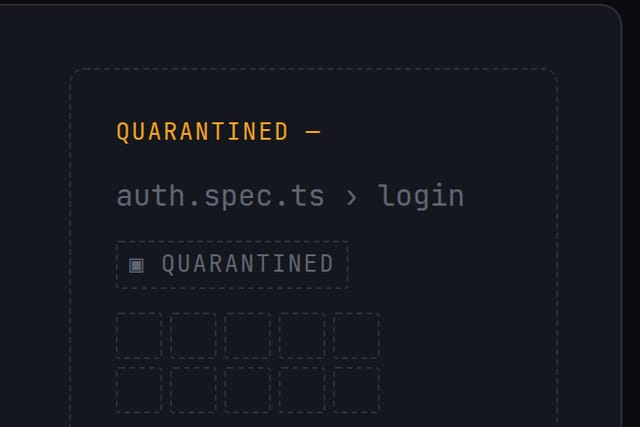
One liar for the whole story: auth.spec.ts › login.
Why
The hero introduces it, the demo quarantines it, the dashboard shows it quarantined and flagged fix first — one example told in order, not unrelated samples.
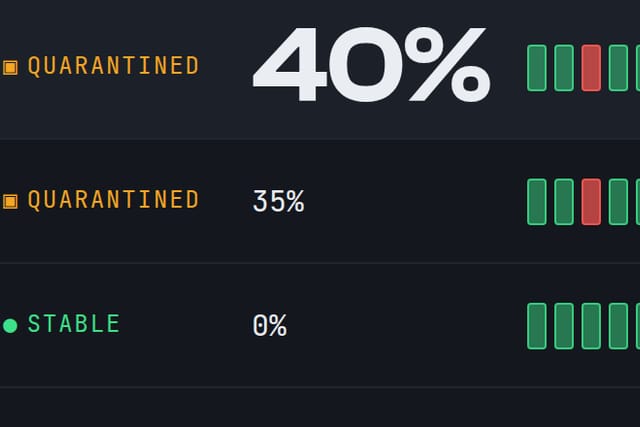
Two brightness levels for the same cells.
Why
The background field stays quiet and the data burns, so the lying test reads at a glance even when nothing moves.
The quarantine is the only asymmetry on the site.
Why
The lying test's row leaves the aligned grid for an amber lane. The layout breaks in one place, because removing the test is the product's job.
Picked over Kill Switch after both were built.
Why
On the prototype the all-green field ate the meaning of green as pass and forced status chips back — the traffic-light cliché the brief ruled out.
Craft you can check
Connect, JavaScript off
All four steps still work: each control is a plain link to the next step, and nothing is sent anywhere.
Keyboard in the demo
Tab into the grid: the arrow keys move across runs and rows, and Enter on the lying test quarantines it.
Reduced motion
Turn it on in your system settings: the live field doesn't load and the flicker stops, while the pattern of runs stays visible.
Color-blindness simulation
Run one in DevTools: every status still reads by its glyph and word — ● PASS, ✕ FAIL, ▣ QUARANTINED.
The numbers, with their conditions.
- Pages measured
- 3
- Lighthouse — performance / accessibility / best practices / SEO, every page
- 100 / 100 / 100 / 100
- LCP, min–max
- 526–604 ms
- CLS, max
- 0
- TBT, max
- 0 ms
- Site weight (JS · CSS · fonts)
- 411.2 KB (44.0 · 99.6 · 88.1)
- axe violations
- 0
- Console errors
- 0
- Without JavaScript: hidden content / dead forms
- 0 / 0
- Overflow sweep: points checked / overflows found
- 408 / 0
Conditions. Measured 2026-10-09 on the site's current build, every page, with the same tool versions as the other two case studies: Lighthouse 13.4.1, desktop preset (its desktop emulation and throttling); axe-core 4.12.1; Chromium via playwright-core 1.62.1; the site served from a local static server; Ubuntu 24.04 in WSL2. This is a lab measurement of the build, not field data from visitors.
Without JavaScript means the same page with JavaScript turned off. Hidden content: a text block that is visible with JavaScript and invisible without it. Dead form: a form that can't be submitted through to its result without JavaScript.
Overflow sweep: widths from 360 to 1440 px in 8 px steps on every page; one point is one page at one width.
Check it yourself: open the live site in PageSpeed Insights and choose Desktop — expect different values, because a public test adds the host's server and network. To repeat the no-JavaScript pass in Chrome, open DevTools, press Ctrl+Shift+P (⌘⇧P on a Mac), run “Disable JavaScript” and reload.
Open the live site flakekill.pages.dev Its footer carries the same studio-concept note.
Other breakdowns
Start with one email.
Replies within one working day.