A forecast that ties out on the first screen.
A fictional cash-forecasting tool for accountants, and its waitlist site.
proofline · Studio concept

- Direction
- Tick & Tie
- Measured
- 100 / 100 / 100 / 100Lighthouse, all 5 pages443–563 msLCP, min–max0CLS, max
2026-10-09 · lab run, not field data · Lighthouse 13.4.1, desktop preset · scores: performance / accessibility / best practices / SEO Full conditions
A fictional cash-forecasting tool for accountants, and its waitlist site.
- Direction
- Tick & Tie
- Measured
- 100 / 100 / 100 / 100Lighthouse, all 5 pages443–563 msLCP, min–max0CLS, max
2026-10-09 · lab run, not field data · Lighthouse 13.4.1, desktop preset · scores: performance / accessibility / best practices / SEO Full conditions
The brief
Proofline turns bank statements and system exports into one ledger, reconciles it and forecasts cash 13 weeks ahead for accountants and outsourced CFOs. A deterministic engine computes every number; an AI agent only explains it. The site had to answer one doubt: “AI invents numbers — I can't sign off on what I can't check.”
- Product
- Cash forecasting and reconciliation across many client companies, in development
- Audience
- Solo accountants and small firms with 10–30 client companies; outsourced CFOs
- Site's job
- Sign-ups for the early-access waitlist
Studio concept: the company and the numbers on its site are fictional too.
Tick & Tie
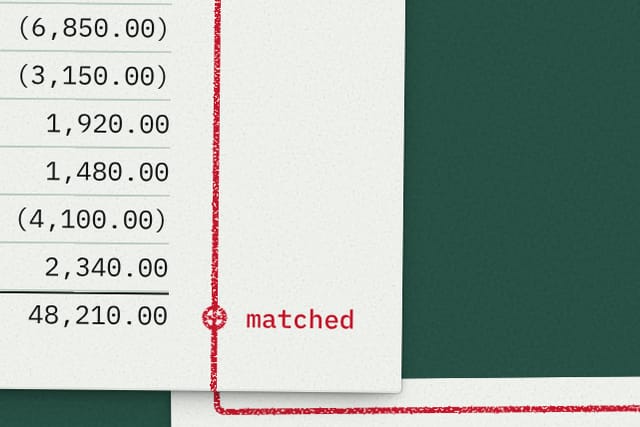
The objection is about checking, so the site shows a check instead of claiming one: an auditor's desk, typeset documents on green baize, and a red pencil line tying a forecast figure to its bank-statement line. The world comes from the audience's own profession. Signature — The Tie: three stacked documents and a red trace from the forecast total, through the ledger entry, to the statement line.
Directions drawn
- Tick & Tie (chosen)
- Core Sample
- Plain Statement
- Thirteen Weeks
Key decisions
The first-screen event is the check itself.
Why
The documents are already on the desk; only the pencil moves — it ticks the total, matches the ledger entry, ties out to the statement line, once per page load.
Documents are live text, not pictures.
Why
On the live site the figures can be selected and checked — that is the proof. The view stays straight down; no 3D perspective distorts the type.
Every sheet that depicts the product is stamped “Illustration”.
Why
The product is still in development, so the site must not pass sample screens off as a working product.
Red means one thing: a checked figure or an exception.
Why
Anything still waiting on the client gets a graphite mark instead, so red never turns into decoration.
Picked over a direction built on the 13-week forecast.
Why
That one put the prediction at the center. The audience's doubt is about checking, so the chosen direction leads with the check.
Craft you can check
JavaScript off
Reload the home page: the full red trace and every check mark are already there. The path is in the HTML; the script only animates it.
Pick a figure
Choose another figure with JavaScript still off: the trace and its breakdown switch anyway — that part runs on CSS.
Select the text
Every document is typeset text, not an image. The pages load no image files at all; even the paper grain and baize are generated in code.
The waitlist form
Submitting opens a confirmation page and sends your entry nowhere. The line under the form says so: “Demonstration site — entries are not sent.”
The numbers, with their conditions.
- Pages measured
- 5
- Lighthouse — performance / accessibility / best practices / SEO, every page
- 100 / 100 / 100 / 100
- LCP, min–max
- 443–563 ms
- CLS, max
- 0
- TBT, max
- 0 ms
- Site weight (JS · CSS · fonts)
- 289.5 KB (21.4 · 72.6 · 62.7)
- axe violations
- 0
- Console errors
- 0
- Without JavaScript: hidden content / dead forms
- 0 / 0
- Overflow sweep: points checked / overflows found
- 680 / 0
Conditions. Measured 2026-10-09 on the site's current build, every page, with the same tool versions as the other two case studies: Lighthouse 13.4.1, desktop preset (its desktop emulation and throttling); axe-core 4.12.1; Chromium via playwright-core 1.62.1; the site served from a local static server; Ubuntu 24.04 in WSL2. This is a lab measurement of the build, not field data from visitors.
Without JavaScript means the same page with JavaScript turned off. Hidden content: a text block that is visible with JavaScript and invisible without it. Dead form: a form that can't be submitted through to its result without JavaScript.
Overflow sweep: widths from 360 to 1440 px in 8 px steps on every page; one point is one page at one width.
Check it yourself: open the live site in PageSpeed Insights and choose Desktop — expect different values, because a public test adds the host's server and network. To repeat the no-JavaScript pass in Chrome, open DevTools, press Ctrl+Shift+P (⌘⇧P on a Mac), run “Disable JavaScript” and reload.
Open the live site proofline-7o1.pages.dev Its footer carries the same studio-concept note.
Other breakdowns
Start with one email.
Replies within one working day.